PDF Toolkit - Reader
LimetechProductivity
4.540.00 Reviews
- Version
- 1.0.8
- Installs
- 500.00K
- Age Rating
- Everyone
Screenshots
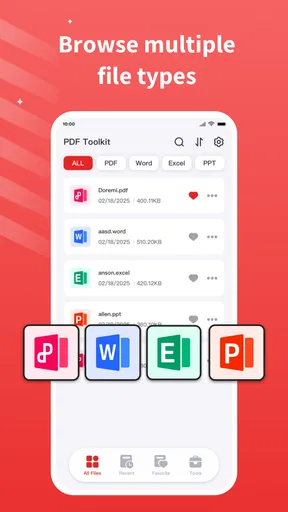
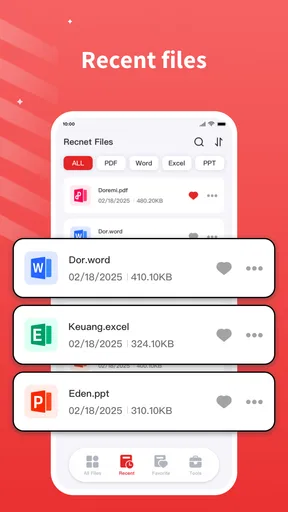
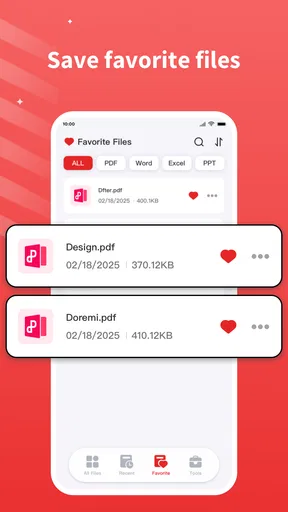
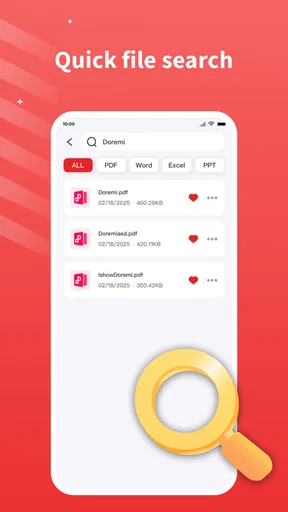
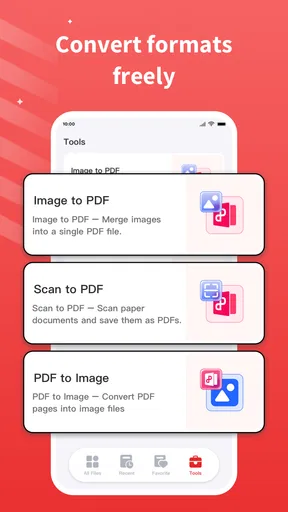
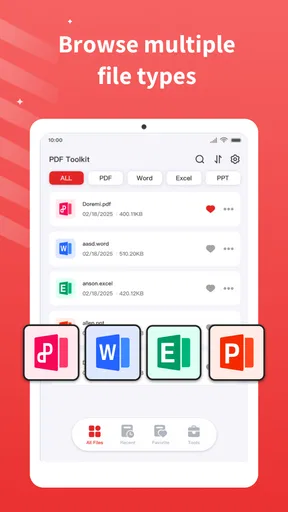
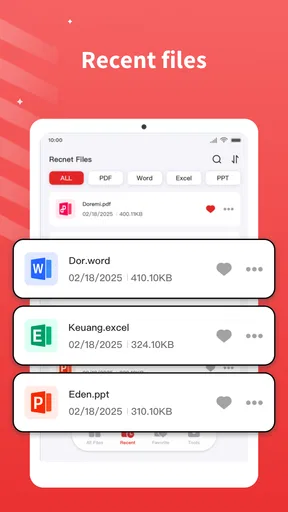
Our Review of PDF Toolkit - Reader
 Analysis by Appyee
I spent time with PDF Toolkit - Reader as a practical productivity app rather than treating it like a full office suite. Its purpose is straightforward: help you read documents and convert file formats from a mobile device. That focus matters because many people do not need a complicated document platform; they need something that can open a file quickly, make it easier to handle, and support a simple conversion task without turning the phone into a desktop workstation.
My first impression is that this is best understood as a utility for everyday document handling. It belongs to the productivity category, is developed by Limetech, and is available free of charge. That makes the decision to try it easy, especially for someone who only occasionally works with PDFs. I would not approach it expecting a complete replacement for a desktop PDF editor, a cloud document workspace, or a dedicated business scanner. Its appeal is the gap between those heavyweight tools and the basic document viewer already installed on a phone.
How PDF Toolkit - Reader fits into everyday document work
The app’s central promise is useful because PDFs are often awkward on mobile. A document may arrive in an email, messaging conversation, download folder, or cloud storage account, and the immediate need is usually simple: read it, identify what it contains, or turn it into a more convenient format. A focused reader and converter can reduce the number of steps between receiving that file and actually using it.
I found the most convincing use case to be short, practical sessions. Imagine receiving a form while away from your computer. You want to inspect the pages, confirm that the text is readable, and convert the document if another format is more suitable for the next step. An app built around those actions is more convenient than opening a browser-based service, signing into an unfamiliar website, and moving a personal file through several screens.
That convenience is also why the app should be judged by how clearly it handles the basics. A document tool does not need to feel exciting. It needs to make file selection understandable, keep reading comfortable, and avoid making a simple conversion feel like a technical project. In my view, PDF Toolkit - Reader has a sensible role for people who want a compact mobile utility rather than a large collection of unrelated office features.
What the free access means for the decision
The app is free, so there is no purchase price to weigh against a promised feature set. That gives it an immediate advantage over paid document software for casual users. If I only need to read a PDF now and then or convert a file for a specific task, free access makes experimentation reasonable. I can see whether the workflow suits me without committing money first.
Free does not automatically mean complete, though. The important question is whether the available tools match the job. Someone who needs advanced editing, professional document production, or a carefully controlled business workflow may still need another application, even if this one costs nothing. The value here comes from accessibility and convenience, not from assuming that a free utility can replace every specialist tool.
I also think the free model changes how I would recommend it. I would suggest trying it as a secondary document tool, especially if the existing phone reader does not handle conversions. I would be more cautious about making it the only document app for work that involves sensitive records, complex revisions, or strict formatting requirements. The right expectation is important: this is a free productivity aid for reading and format conversion, not automatically a complete document office.
Reading documents without overcomplicating the task
The reading side is likely to matter most to people who open documents on a phone in short bursts. A useful mobile reader should support a quick check before a meeting, a review of an attachment during a commute, or a look at a reference document while shopping or traveling. I like this kind of focused workflow because it avoids opening a full editing environment when I only need to understand the file.
One practical habit is to use the reader as a first-pass filter. Instead of immediately converting every document, I would open it, check whether the content is already usable, and convert only when the next app or recipient genuinely needs another format. That saves unnecessary steps and reduces the chance of creating duplicate files with confusing names. It also keeps the original PDF available as the stable reference copy.
Another helpful approach is to separate reading from conversion. When a file is important, I would read it first and then perform the conversion as a distinct action. This makes it easier to notice whether the converted result has preserved the information I need. Conversion is not just a button press; the output should be checked before the original is discarded or shared.
Where conversion can add real value
Format conversion is most useful when a PDF is being used as an input rather than an end product. For example, a document may need to be moved into an editable workflow, attached to a system that accepts another format, or made easier to process in a different mobile app. In those situations, a built-in conversion tool is more convenient than searching for a separate service every time.
My advice would be to treat conversion as a controlled handoff. Keep the source file, create the converted copy, and compare the two before sending anything important. Pay attention to page breaks, text placement, tables, and any visual elements that carry meaning. A conversion can be useful while still needing a quick inspection, particularly when the original document has a layout that was designed for fixed pages.
This is one of the less obvious trade-offs of a mobile toolkit: convenience reduces friction, but it can also encourage people to trust the first output without checking it. I would use the app confidently for routine files and preliminary work, while taking more care with contracts, forms, invoices, or documents where a small layout change could alter the meaning.
Small workflows that make the app more useful
I would organize my use around three simple habits. First, I would open a document before deciding what to do with it. That prevents unnecessary conversions. Second, I would give converted files clear names that indicate the format or purpose. Third, I would keep the original alongside the new copy until the result has been reviewed. These habits are not flashy features, but they make a document utility safer and easier to manage.
A second workflow is useful for travel or temporary work. I would prepare the documents I expect to need, use the reader to confirm that each file opens properly, and convert only the items that must be shared or edited elsewhere. This reduces last-minute searching when internet access is inconvenient. It also makes the phone’s file storage less cluttered because every conversion has a reason.
For students, a similar process can help with course materials. A PDF can remain the reference version while a converted copy is used for notes or another study tool. I would still compare the pages after conversion, especially if the material contains diagrams, columns, or unusual typography. The app can simplify the first step, but it does not remove the need for judgment about whether the new format is appropriate.
What it does well compared with usual alternatives
The usual alternatives fall into three groups: the basic PDF viewer already on a phone, a full office suite, and a web-based conversion service. The built-in viewer may be perfectly adequate for reading, but it often does not cover the conversion part of the workflow. A full office suite may offer more editing depth, yet it can feel excessive when the task is simply to inspect a file and change its format.
A web converter can be convenient, but it adds browser steps and makes the process feel less direct. It may also be a poor fit when I want to keep a document workflow inside one mobile app. PDF Toolkit - Reader is more appealing in that middle ground: more purposeful than a basic viewer and less demanding than a large office platform.
That comparison should not be mistaken for a claim that it wins every situation. If I need collaborative editing, advanced annotations, document signing, or a broad set of office tools, I would choose a specialized alternative designed for that job. The strength here is narrower. It is the possibility of handling reading and conversion in one focused productivity utility without paying for access.
Limitations I would consider before relying on it
The biggest limitation is the natural boundary of its purpose. Reading and conversion are useful, but they do not cover every document need. Someone looking for a complete editing environment may quickly find the app too limited. Even when a conversion succeeds, the result may require checking before it becomes the working copy.
I would also avoid assuming that every PDF behaves the same way. Simple text documents are usually better candidates for a smooth mobile workflow than files built around complex layouts, embedded graphics, or specialized forms. That is not a criticism unique to this app; it is a general reality of format conversion. Still, it affects how much confidence I would place in the output.
There is also a difference between occasional convenience and professional dependence. For occasional personal documents, the free price and focused purpose are compelling. For a workplace process involving repeated conversions, formal review, or strict output consistency, I would test the app against representative files before making it part of a routine. A free tool can be valuable without being the right foundation for every organization.
Who is most likely to get value from it
I would recommend PDF Toolkit - Reader to students, travelers, freelancers, and anyone who regularly receives PDFs but does not want a large office suite. It makes particular sense for people who use their phone as a practical file station rather than only as a communication device. The free price lowers the barrier, while the focused feature set keeps the purpose easy to understand.
It is also a sensible choice for someone whose current reader handles viewing but leaves conversion awkward. In that case, the app fills a specific gap instead of forcing a complete change in the way documents are managed. I would start with ordinary, non-sensitive files and see whether the reading and conversion flow feels comfortable before using it for more important material.
I would skip it, or at least look elsewhere first, if my main requirement were advanced PDF editing, team collaboration, signing, or highly controlled business output. I would also choose a different tool if I needed a broad office environment rather than a focused reader and converter. The app is strongest when the need is modest, clear, and mobile.
Platform details and everyday accessibility
PDF Toolkit - Reader is listed for everyone and supports Android seven point zero and later, which makes it accessible to many users with older devices as well as newer phones. Its current version is 1.0.8, and the app has reached over 500 thousand installs. Those figures suggest that it is not an obscure experiment, while the average rating of 4.5 from around 2.8 thousand ratings gives it a positive reception among people who have tried it.
I would still interpret those signals carefully. Popularity can tell me that the app is reaching a real audience, but it does not guarantee that every conversion workflow will suit my files. The most useful test remains personal: open the kinds of documents I actually handle, try the conversion I need, and inspect the result. That is more informative than relying on a rating alone.
My buy-or-skip verdict
Because PDF Toolkit - Reader is free, I see little reason for a casual Android user to rule it out before trying it. Its strongest value is practical: it brings reading and file conversion into a focused productivity app, which can be more convenient than switching between a basic viewer, a browser service, and a full office suite. For everyday documents, that narrower approach may be exactly what is needed.
My recommendation comes with a clear condition: use it as a convenient document utility, not as an automatic substitute for every PDF tool. Keep original files, inspect converted copies, and be more cautious with documents whose layout or accuracy is critical. If your needs are reading and occasional conversion, I think the free access makes it worth installing. If you need deep editing or professional document control, I would skip relying on it as your main solution and choose a specialist instead.
My final take: this is a useful, low-risk option for people who want a simple mobile route from receiving a PDF to reading it or preparing a converted copy. The app’s value is not in promising everything; it is in addressing a common, specific problem without adding a purchase decision. For that audience, PDF Toolkit - Reader is easy to recommend as a practical addition to an Android phone.
Verdict
Strengths of PDF Toolkit - Reader
- Supports multiple PDF viewing and management tools in one app.
- Quickly opens documents without requiring an internet connection.
- Useful search function helps locate text within long PDFs.
- Simple interface makes basic PDF tasks easy for new users.
- Can reduce the need to install several separate PDF utilities.
Limitations of PDF Toolkit - Reader
- Advanced editing features may be limited compared with desktop PDF software.
- Some tools or features may require in-app purchases or a subscription.
- Large documents can take longer to load on older devices.
- PDF conversion results may vary depending on the source document.
- Ads may interrupt the experience in the free version.
Similar Picks in This Category
View All
Google Calendar
Google LLC4.6

Google Drive
Google LLC4.3

Google Assistant
Google LLC3.9

Microsoft OneDrive
Microsoft Corporation4.6

Samsung Calendar
Samsung Electronics Co., Ltd.4.1

Microsoft OneNote: Save Notes
Microsoft Corporation4.6
Frequently Asked Questions
What is PDF Toolkit - Reader used for?
PDF Toolkit - Reader is designed for opening, reading, and managing PDF documents on a mobile device. It can be useful for viewing manuals, forms, ebooks, receipts, and work or school files without needing a desktop computer. Depending on the version installed, it may also include practical tools such as searching within documents, zooming, page navigation, sharing, and basic file organization features.
Can PDF Toolkit - Reader open all PDF files?
The app should handle most standard PDF documents, including text-based files, scanned pages, and documents containing images. However, very large files, password-protected PDFs, damaged documents, or files using unusual fonts and advanced interactive features may not display perfectly. If a document does not open correctly, updating the app, downloading the file again, or trying another compatible PDF viewer may resolve the problem.
Does PDF Toolkit - Reader work without an internet connection?
PDF Toolkit - Reader can generally be used offline after a document has already been downloaded or saved on the device. This makes it convenient for reading files while traveling or in places with limited connectivity. Internet access may still be required for downloading documents from cloud services, opening online links, synchronizing files, displaying advertisements, or using any features that depend on external storage or web-based services.
Is PDF Toolkit - Reader free to download and use?
The app may be available as a free download, but the exact experience can depend on the version and platform. Free editions sometimes include advertising, optional in-app purchases, or limitations on certain tools and advanced functions. Before installing, check the listing for current pricing, subscriptions, and purchase details. Also review the permissions requested so you understand what access the app requires.
Is PDF Toolkit - Reader safe for private or sensitive documents?
PDF Toolkit - Reader can be convenient for viewing personal files, but users should still be careful with confidential documents such as identity records, contracts, medical information, or financial statements. Review the app’s privacy policy and requested permissions before importing sensitive files. Avoid sharing documents unnecessarily, keep your device protected with a screen lock, and use password-protected PDFs when stronger privacy is needed.
